Customer changed a detail, or you had to step away? Moveka keeps your delivery drafts together so you can finish the same order. A draft is a delivery you started and can return to finish.
1. Open your merchant deliveries
- Go to https://moveka.africa. Open the top-right three-line menu and tap Merchant sign in. You can also open https://merchants.moveka.africa/login.
- Enter Email and Password and tap Sign In. If Moveka asks you to choose a business, find the shop or team whose order this is and tap Open delivery workspace.
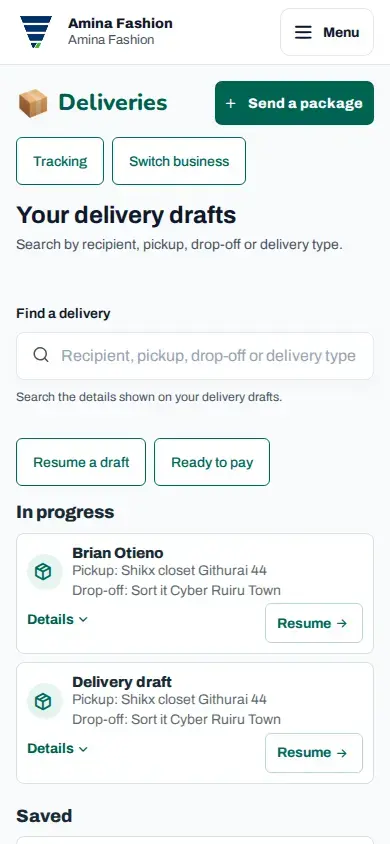
- If you are on another merchant page, tap Menu at the top right, then Deliveries. Check the business name; use Switch business if needed.
2. Find the unfinished order
- Tap Resume a draft, or scroll to In progress or Saved. These sections contain deliveries you can continue preparing.
- Look for the recipient and route. Use Find a delivery if the list is long.
- Tap Resume beside the matching order. Continue from the step Moveka opens.
3. Change the detail and review
- Check the information already filled in. In particular, check the customer’s phone number and where the package should go.
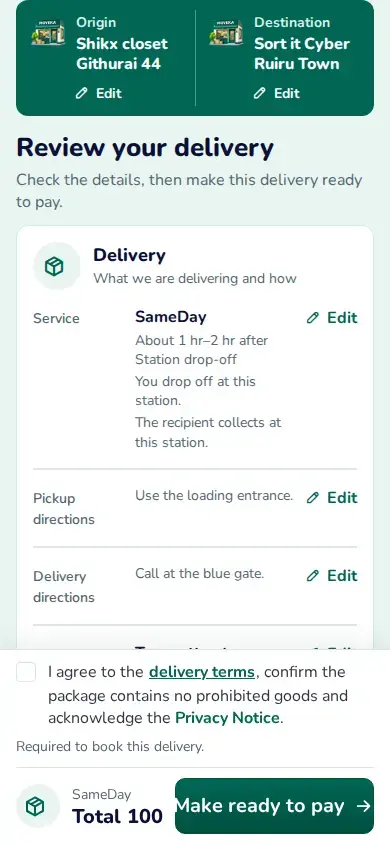
- On Review your delivery, tap Edit beside the section you want to change. If Apply changes appears after your edit, tap it to return to the review.
- Scroll through the updated order, current charge and terms. When ready, tap Make ready to pay. Ready to pay is the list where you select reviewed orders for payment.
Review the updated delivery before continuing
Already in Ready to pay?
Pay for the deliveries you have reviewed
In Deliveries, find the order under Ready to pay and tap Review delivery. Choose Edit this delivery to make a correction. The order returns to In progress while you edit; review it and tap Make ready to pay again when finished.
Payment already started?
Find the same order under Awaiting payment and tap View to check the payment result. If Edit delivery is offered, use it for corrections and review before paying. A pending payment needs checking before you decide to send another prompt.
Can’t find the order?
Clear the search and check the business name again. If you cannot edit the delivery, ask your Merchant Owner, Merchant Admin or Business Admin to check your access. Keep working from the same order so your customer’s delivery details stay together.