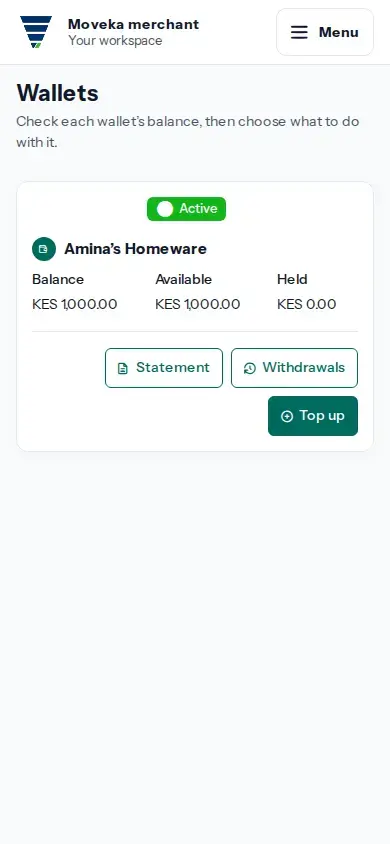
Your account → Wallets shows the wallets available to your sign-in without opening one business workspace. Wallets may belong to different businesses or operating accounts, so check the wallet type and label before choosing an action.
- Open Menu and choose Profile. Open Menu again, then choose Wallets under Your account. The account-wide link is shown when you can view at least one wallet; merchant wallet cards are available to active Merchant Owners and Administrators.
- Find the card with the correct type and label. Check Balance, Available and Held before acting. Available is the amount the wallet currently reports as available; Held is already reserved by the wallet service.
- Choose Statement to review posted wallet movements, or Withdrawals to review withdrawal requests when those controls are shown. Methods lists withdrawal destinations when you have access.
- Use Top up or Withdraw only on the wallet you selected. These actions open a request; check the same operation for its result. A prompt or request is not confirmation that money arrived or was sent.
Controls depend on the wallet and your current access. If an expected wallet or action is missing, ask its Merchant Owner or operating-account administrator to review your access. Wallet PIN and Direct M-Pesa handles appear only for people authorized to manage that wallet.
For a card marked Merchant wallet, use the matching task guide for its top-up, withdrawal or activity steps. Account wallet cards can have different permission rules.