A withdrawal sends money from a merchant wallet to an active withdrawal method. You can request one only when the wallet and action are available to your account.
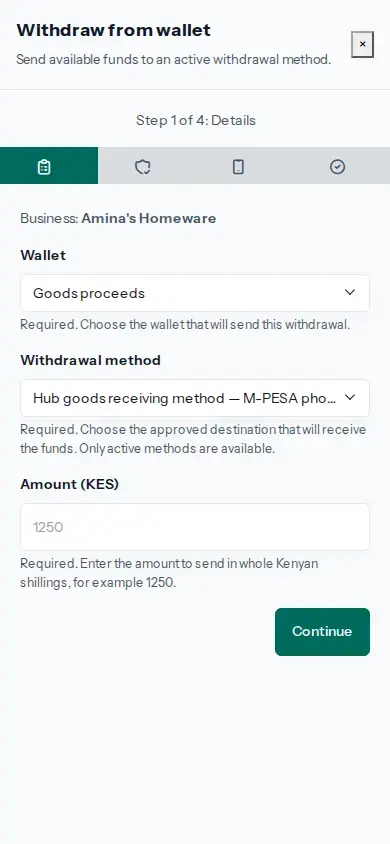
- Open Menu, then Wallets. On the wallet, tap Withdraw. If there is no active destination, ask the Merchant Owner to add and confirm a withdrawal method under Methods.
- Choose the wallet, active withdrawal method and whole-shilling amount. Tap Continue to review the wallet, destination and amount.
- Check those details carefully. Enter the current Wallet PIN, complete any requested security check and tap Request withdrawal.
- On the same withdrawal, tap Request confirmation code. When your wallet provider sends the code, return to Moveka and enter it on that withdrawal. Complete any requested security check, then tap Confirm and dispatch. If the code expires, request a new one on this withdrawal.
- Open Withdrawals and check the request. Use Refresh on that withdrawal if its status needs checking. Succeeded means completed; Processing means the provider has not finished; an unknown result needs checking on the same withdrawal before any further action.
A withdrawal request or confirmation code does not mean the money has arrived at its destination. Check the status shown for that exact withdrawal. Do not start a second withdrawal while the first result is unknown.