Waiting for an order? Moveka tracking shows the latest recorded progress, so you know what has happened and what comes next. You do not need the sender’s merchant login.
Have your package reference ready
The package reference is the code identifying your parcel. Ask the sender for it or for the public tracking link. A label code can also be used. If you already have a tracking link, open it and continue to the status check below.
1. Find tracking on Moveka
- Open https://moveka.africa. Tap the three-line menu at the top right, then Track a package.
- Under Package reference, enter or paste the reference, label code or tracking link. Tap Track.
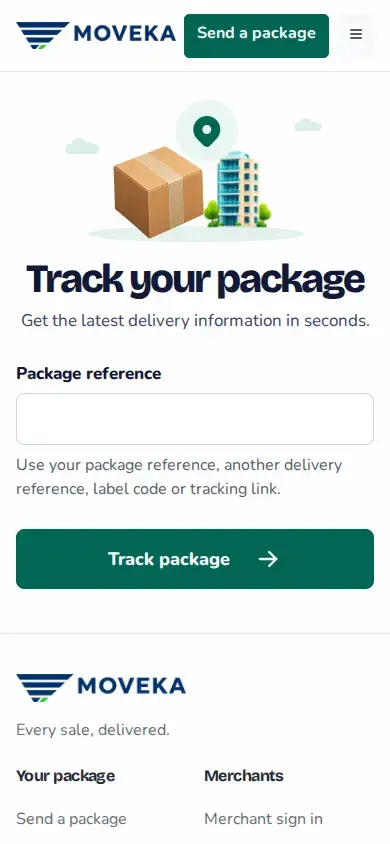
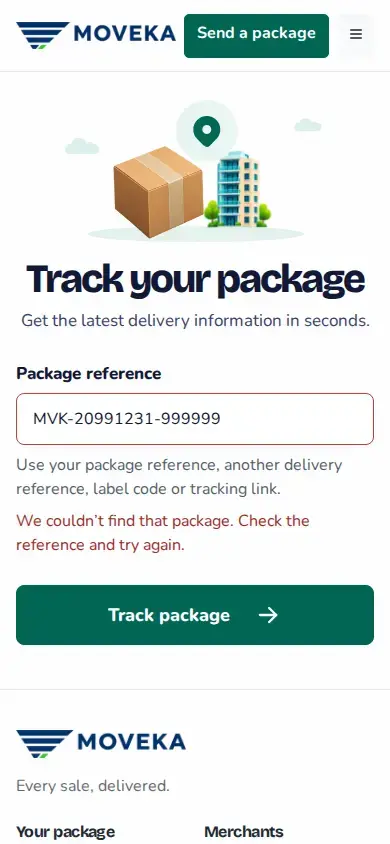
- You can also open https://moveka.africa/tracking for the form shown below. There, enter Package reference and tap Track package.
2. Read where the delivery has reached
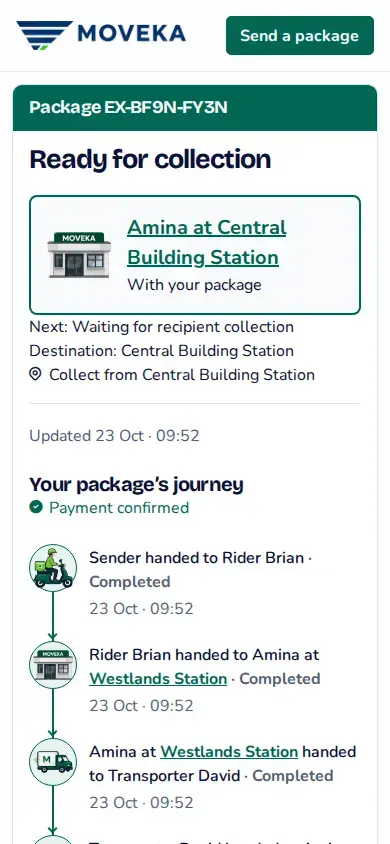
- Read the current status and when it was last updated. Check the next step or delivery time shown.
- Read the journey details where offered. If a Station name opens more details, use it to check the place involved in the next handoff.
- For Station collection, wait until tracking says Ready for collection at the named Station. A parcel travelling there is not ready to collect yet.
3. Share the update when useful
On a public tracking page, tap Share tracking or the share icon where shown and choose who should receive it. You can also send the package reference so they can enter it on Moveka.
Reference not found?
- Check for a missing character or extra space, correct the reference and tap Track package again.
- If it still does not match, ask the sender to resend the full package reference. If a tracking link is unavailable, use the reference instead.
Need to coordinate the handover?
Follow the next step on your package. If the page names a rider and offers a call action, use that contact for this delivery. Payment, pickup and arrival are different steps; the written delivery status tells you which has been recorded.