Collect your order when it suits the available collection window. A Moveka Station is an attended place where staff hand over packages to their recipients. Check that your parcel is ready before making the trip.
Before leaving home
- Have the package reference or tracking link from the sender. The reference is the code identifying your parcel.
- Keep the phone number used for this delivery with you. If a delivery code is required, it is sent to that phone.
- If the order needs payment before collection, have your digital payment method ready.
1. Check that collection is ready
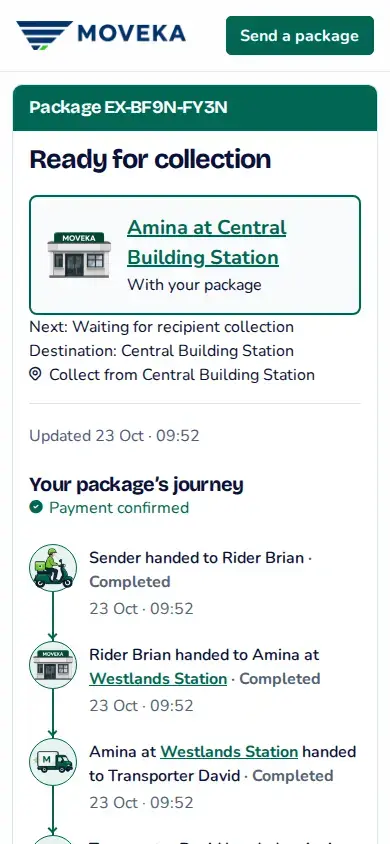
- Open the public tracking link the sender shared. Or open https://moveka.africa, tap the top-right three-line menu, then Track a package. Enter Package reference and tap Track.
- Wait until the status says Ready for collection. Check the collection Station and any deadline shown. Sawa, now you know where to go.
- Open the Station details where offered. Check its entrance and opening hours, then tap Get directions.
2. Tell the attendant which parcel is yours
- At the named Station, give the attendant the package reference and tell them you are the recipient.
- If asked for a delivery code, open the Moveka text message and read that code to the attendant handling this collection.
- If the attendant asks for a code you cannot find, do not guess. Pause collection and check the message or tracking page for this delivery before continuing.
3. Complete any payment shown
If payment is required for your package, open the payment link or scan the QR code provided for it. Follow the instructions and complete the digital payment yourself. Wait for Moveka to confirm payment before taking your package.
Pay the goods amount digitally before the package is released
4. Receive your parcel
Take the package only after the attendant confirms the collection checks are complete. You can revisit Moveka tracking to check the latest recorded status.
The parcel is elsewhere or collection is blocked?
If the code fails or the collection deadline has passed, check the same tracking page for the latest status and follow its next step. Do not travel to another Station unless tracking says the package is ready for collection there.