Notification history shows messages sent for an account you can view. It records each message and its channel outcomes.
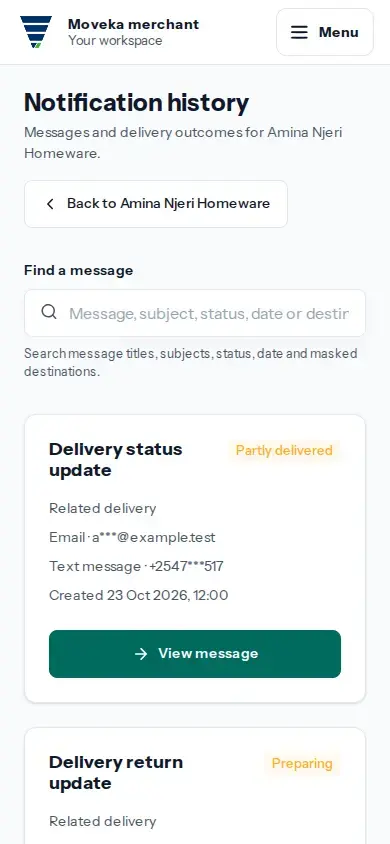
- Open Accounts and choose the account whose messages you need to check. In its Open section, tap Notification history.
- Search by message, subject, status, date or destination. Tap View message on the matching result to see its channel outcomes.
- Read each channel separately. Preparing means Moveka is still preparing the message. Accepted means the email or SMS service accepted it, but delivery to the recipient is not confirmed. Delivered means that channel confirmed delivery.
- If the message is partly delivered or needs attention, review which channel has the problem and its description. If a channel says Result unknown, do not assume the recipient received it; the delivery result has not been confirmed.
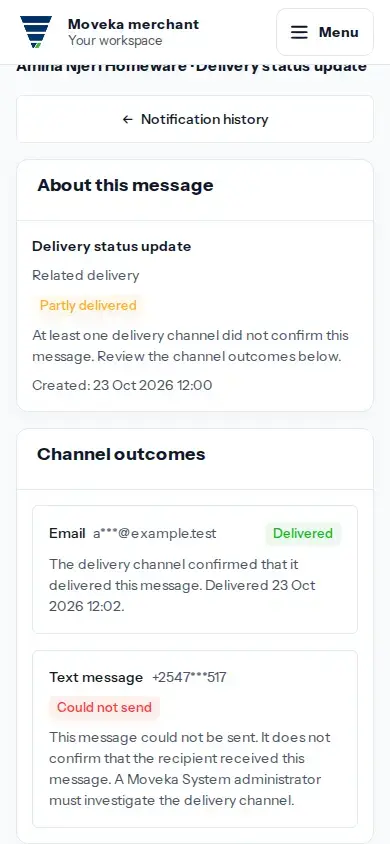
Use the channel details to understand the delivery result recorded for each message.
If you cannot open Notification history, check that you are signed in to a login with access to the account. Ask that account’s administrator to grant access if it is missing from Accounts.