The delivery can be cancelled while its refund is still due. Open the same package in Merchant Deliveries and use its cancellation receipt to check the current refund amount and status.
Read the receipt
- Refund approved means the amount is recorded as due, but has not been transferred. Your refund is awaiting Moveka Finance; keep checking this receipt.
- Awaiting wallet transfer means your refund is awaiting Moveka Finance and the transfer is not confirmed yet; keep checking the same receipt.
- Refund transfer needs checking, Refund record needs checking, or Refund transfer needs review means your refund is awaiting Moveka Finance. Keep using this receipt to check its current status, and do not arrange another payment while it is unresolved.
- Transferred to your Business wallet means Money confirmed the refund transfer.
- Refund payment is blocked means the Business needs a linked receiving wallet. The Merchant Owner can open Wallets in Merchant navigation to choose one for this Business; on an Express receipt, use Open Merchant wallets if shown. If you are not the Owner, ask them to link the wallet, then reopen the cancellation receipt.
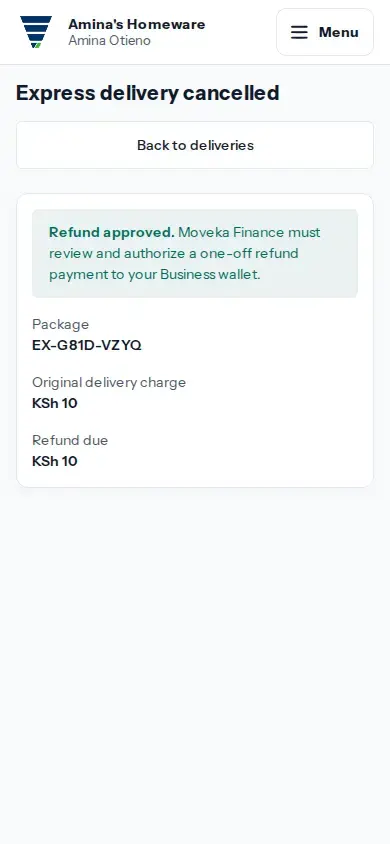
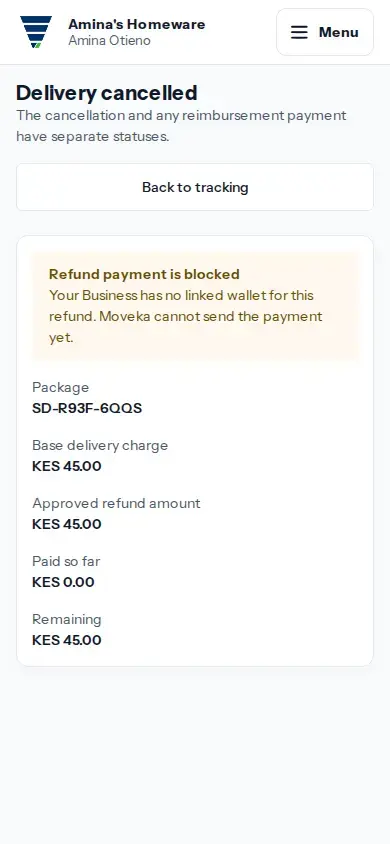
View larger image: Check the SameDay cancellation and reimbursement statuses. (opens in a new tab)
Use the right recovery
To reopen the receipt, open the tracking list in Merchant Deliveries and tap View cancellation for an Express package or Cancellation details for a SameDay package. For SameDay, compare Approved refund amount, Paid so far and Remaining. For Express, compare Refund due and Refund paid when shown. A partial payment leaves a remaining amount due. Do not cancel the delivery again or treat a payment request as proof of completion.
Only a confirmed transfer counts as paid. Moveka does not promise a fixed refund time on these receipts.