A Wallet PIN protects wallet actions. Keep it private and enter it only on the Moveka wallet page. It is different from your account password, M-Pesa PIN and package delivery code.
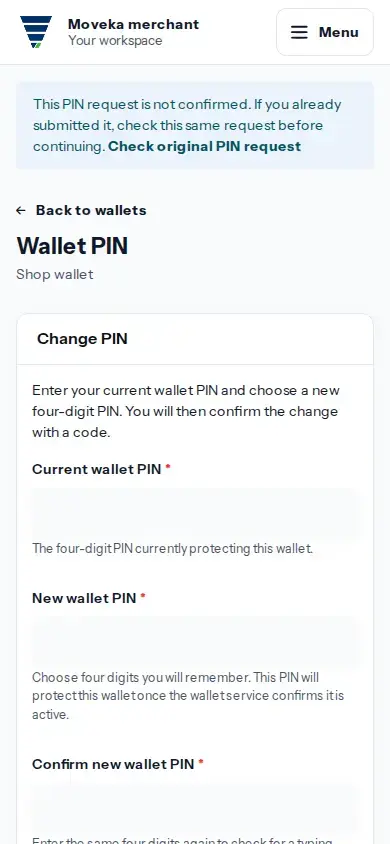
- The Merchant Owner opens Menu, then Wallets. On the wallet, tap Wallet PIN. Team members who need a PIN change should ask the owner.
- To change a PIN you know, enter the current PIN and a new four-digit PIN, then tap Request PIN change. When the confirmation code arrives, return to Moveka and enter it on the same PIN request.
- If you cannot remember the PIN, choose Forgot wallet PIN and select a recovery channel shown for the wallet. When the wallet provider sends a recovery code, return to the Moveka PIN request and enter it there, then choose a new four-digit PIN.
- Use the same PIN request page to check its status. If it says the new PIN is waiting to become active, check again before using it.
- If a PIN request is unknown or a code expires, use Check this PIN request or the available Start again action on that page. Re-enter security details when asked; they are not saved for you.
Never share your Wallet PIN, account password, M-Pesa PIN or verification code with a customer, courier or teammate. A delivery code is used only for the package handover it describes.