Use this when your business created and paid for a merchant Express delivery that has not entered custody. Express cancellation stops the delivery before pickup and records the full paid delivery charge as owed back to your Business. Cancelling does not itself send the refund.
Open the delivery
- Sign in to your Merchant account and open Deliveries.
- Open the exact package and check its status and payment details.
- Tap Cancel delivery if that action is shown. It is available only while the paid Express package is still before pickup.
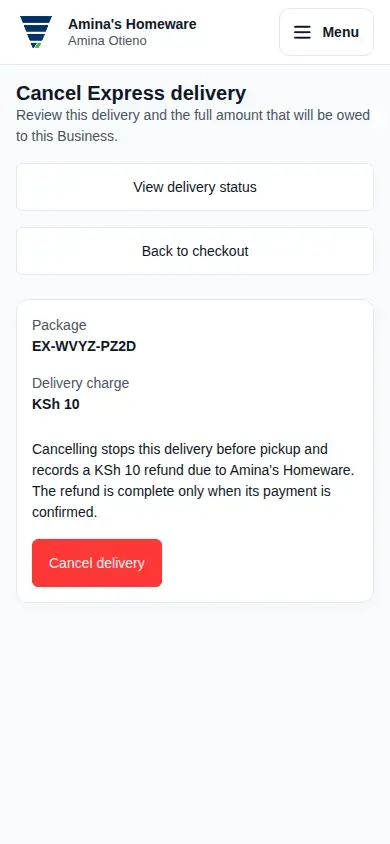
Review before confirming
Check the package reference and Delivery charge. The review explains the same full amount that will be due as a refund to your Business. If either the package or charge is wrong, use View delivery status to return without cancelling.
Tap Cancel delivery once. When Moveka records the cancellation, the Express delivery cancelled page shows the refund status and amount still due. The refund is complete only after the payment is confirmed.
If cancellation is blocked
- If the page says payment could not be confirmed, the delivery was not cancelled. Return to the delivery and wait for its payment status to update, then review again.
- If pickup or custody has started, this cancellation action is no longer available. Follow the current delivery status; use a recovery option only if one is shown for that package.
- If a refund is approved but unpaid, reopen the package and use View cancellation to check the current receipt. If the receipt says refund payment is blocked because no receiving wallet is linked, the Merchant Owner can link one in Merchant wallets. Do not submit a second cancellation while checking its status.