Only the Merchant Owner can manage a handle. The Direct M-Pesa handles action appears for a linked merchant wallet when this payment method is configured. A handle sends all received funds to the wallet shown during setup.
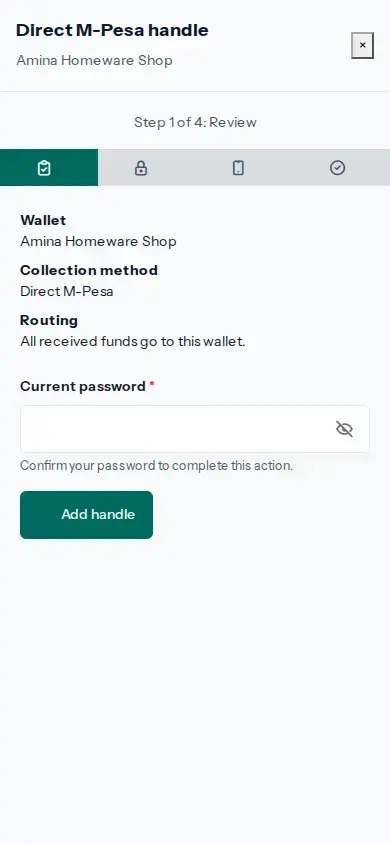
- Open Profile, then Menu → Your account → Wallets. Find the correct Merchant wallet and choose Direct M-Pesa handles.
- Choose Add handle. Check the wallet name and confirm that Routing says all received funds go to this wallet. Enter the account security check requested on screen, then choose Add handle.
- Enter the current Wallet PIN and choose Request activation code. This asks the payment provider to send a code for the handle.
- Enter the activation code from the payment provider and choose Confirm activation.
- Wait for the handle status to show Active. Only then use the Paybill and account number shown on the handle for payments to this wallet.
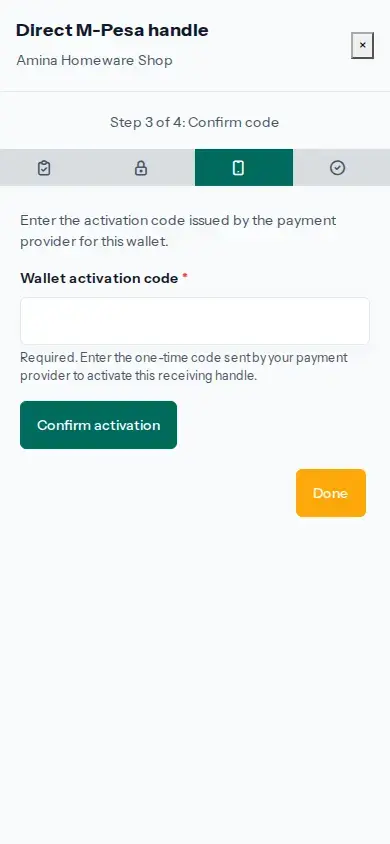
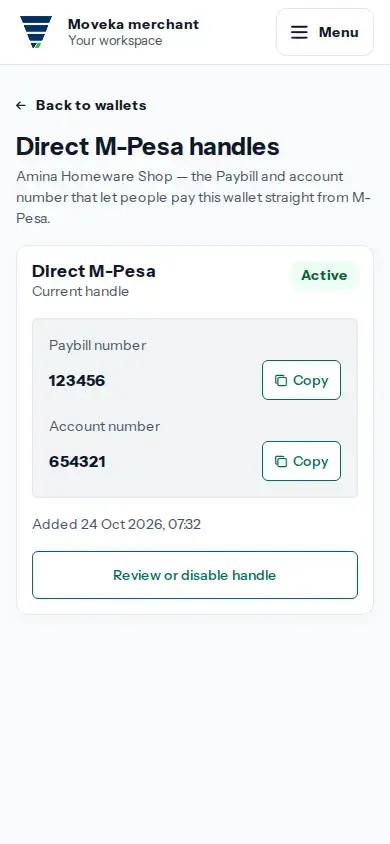
A request or code prompt does not mean the handle is active. Use the status shown by the wallet service, and do not share your Wallet PIN or activation code.