Want to drop off a parcel on your way out, or have a courier meet you? Moveka lets you choose where the package starts and where it ends. A Station is an attended drop-off or collection point. Doorstep means the courier meets the sender or recipient at the selected place.
You do not need every detail to begin. Start with an area, landmark or description you know, then follow the questions to narrow it down before booking.
Choose what works for the people sending and receiving
How doorstep pickup and delivery work
- Station to Station: you take the parcel to the origin Station; the recipient collects from the destination Station.
- Station to doorstep: you drop off at the origin Station; a courier brings the parcel to the recipient’s selected place.
- Doorstep to Station: a courier collects from your selected place; the recipient collects at the destination Station.
- Doorstep to doorstep: a courier meets you for pickup and takes the parcel to the recipient’s selected place.
1. Open Moveka and enter the route
- Open https://moveka.africa and tap Send a package at the top. On this guide, Get my delivery price below opens the same start page.
- If sending through your business account, use the top-right three-line menu, then Merchant sign in. At https://merchants.moveka.africa/login, enter Email and Password, tap Sign In, choose your business if asked, then open Deliveries and Send a package.
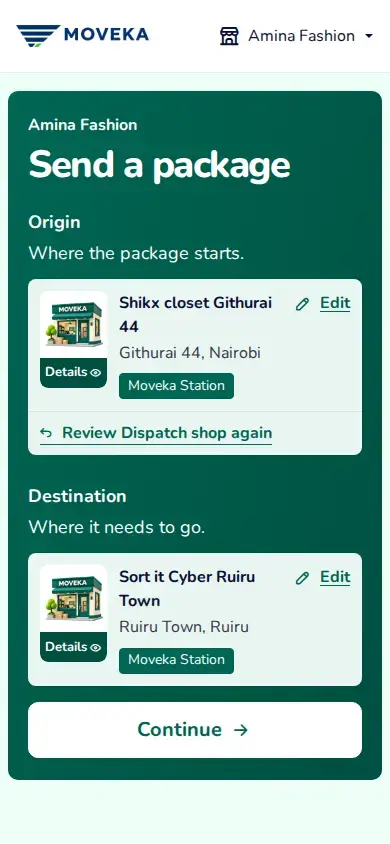
- Origin is where the parcel starts. Destination is where the recipient gets it. Under each heading, use the search box; tap Edit first if a place is already shown.
2. Choose a Station or meeting place
- For a Station, search its name or area, tap Stations and choose the actual Station. Check the name and location. At the origin Station, you bring the package yourself.
- For a doorstep, choose the place that fits your description. Add the entrance, floor, building or landmark the courier needs. For pickup, use Add pickup directions when offered, enter the meeting details and tap Save directions.
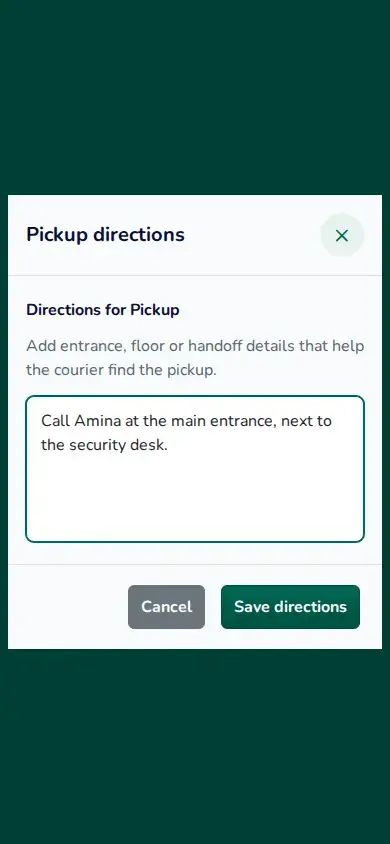
View larger image: Mobile pickup directions form with a meeting-point note. (opens in a new tab)
Video steps
On Send a package, choose an origin and destination Station. To use a doorstep pickup instead, tap Edit Origin and choose the meeting location. Open Add pickup directions, then describe where the rider should meet you. Save the directions. Check the chosen point before reviewing and paying for the delivery. This is a practice route; no payment or pickup takes place.
3. Choose a service and pickup time
- Check both ends and tap Continue. Under Delivery service, compare the SameDay and Express offers shown for your route, including timing and starting price. Choose an available offer and Continue.
- For doorstep pickup, use Schedule later if offered and you need a later time. Choose an available day and time, then tap Use this pickup time.
- Check the accepted route and pickup time on Review your delivery before you agree to the terms and continue.
Still not sure of the exact place?
Keep your original description and add the detail the page asks for next. If a service says the location is unavailable, use Edit Origin or Edit Destination and choose a suitable alternative. Check the updated route and charge before booking.
Ready to see your options? Tell Moveka where the parcel is going.