Use Packages at recovery hubs when a returned package from your Business has reached its recovery hub and the Business needs to recover it.
Find the package and request a price
- In Merchant, open Packages at recovery hubs from the delivery recovery area.
- Search by package code, delivery type or recovery hub. Open the matching package and confirm the reference and hub.
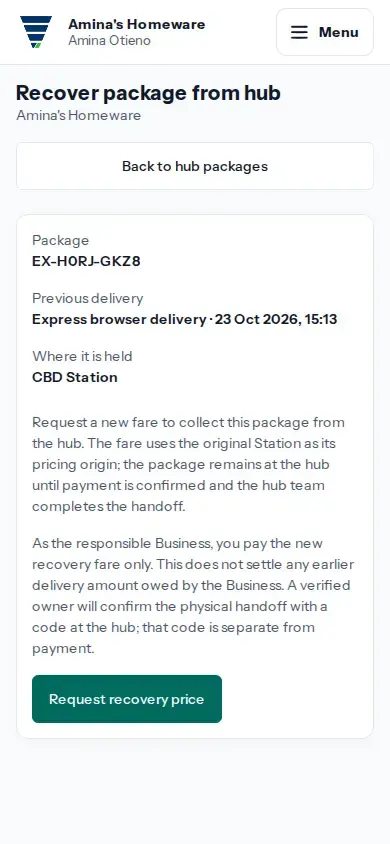
- If no recovery price is open, tap Request a recovery price. If the package list says Review recovery price, tap it to open the package page; when that page says a price is already open, tap Review recovery price there to reopen the same quote instead of requesting another. The fare uses the original Station as its pricing origin; a new recovery price does not settle any amount still owed from the earlier delivery.
- On Recovery price, check the package, hub, recovery fare, goods value and total recovery payment before tapping Request payment.
Pay and complete handoff
- Open the current payment request and follow its digital payment options. The package remains at the hub until payment is confirmed.
- At pickup, a verified Business Owner must complete the owner verification shown at the hub. Payment confirmation alone does not mean the package has been released.
- This recovery payment has no goods charge and does not change whether the goods have been paid for. Any unpaid amount from the previous delivery also remains separate from this recovery payment.
If payment is uncertain
Return to the exact Recovery price page. If payment is pending, open the current payment request to check its status. Use Check and renew payment link only if the page confirms the earlier request expired or was cancelled without payment. After pickup, reopen this page to check whether it says the owner handoff was completed; payment confirmation alone does not show that the package was released.
If no packages appear, check the package reference and search again. If the correct package is not listed, its return may not yet have reached the hub or it may not be eligible for this recovery page; follow its current delivery status.