For a merchant order, choose from the services currently offered for its route. SameDay timing choices depend on the selected origin and the service available.
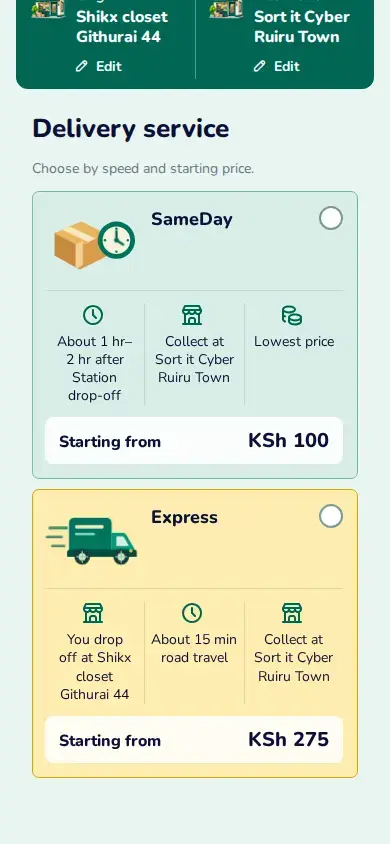
View larger image: Available service options for the selected delivery route. (opens in a new tab)
- On Delivery service, compare the SameDay offer’s timing and price with the other available offer. Choose SameDay only if its displayed option suits the order, then tap Continue.
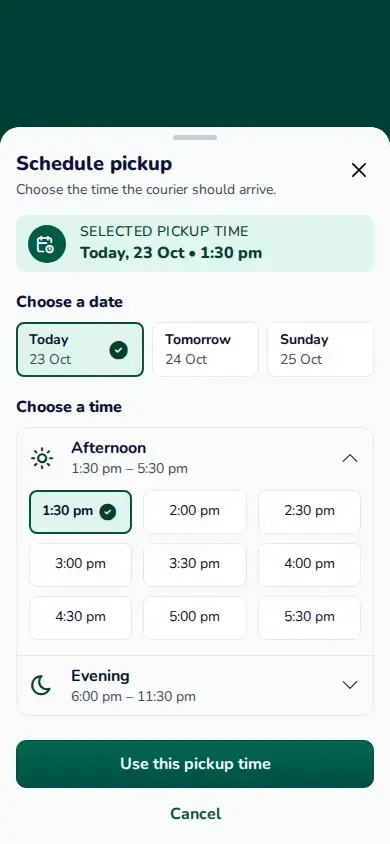
- On Package details, choose the pickup option offered for your doorstep origin. Choose Pickup as soon as possible when available, or tap Schedule later to choose an offered day and time.
- In the time sheet, select a day and an available time, then tap Use this pickup time. Check the accepted time on Review your delivery before tapping Make ready to pay.
A Station origin has no courier pickup-time choice. For a doorstep origin, use only the time currently shown for that route.