Explore Moveka

Guide

Find delivery tracking from your account

Search an account’s deliveries and check the latest recorded status and public-link availability.

Published 23 Oct 2026 · Updated 25 Oct 2026 · By Moveka

Use account Tracking to search deliveries across one operating account, even when they were created in different business workspaces.
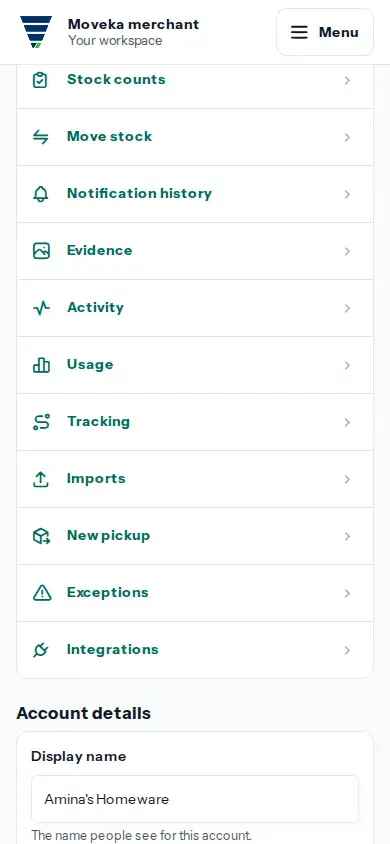
Practice screen: open the account’s visible Tracking page from its list of account services.
Practice example: open the account’s visible Tracking page from its list of account services.

View larger image: Practice screen: open the account’s visible Tracking page from its list of account services. (opens in a new tab)

  1. Open Menu, choose Accounts, and open the account that owns the delivery.
  2. Under Open, choose Tracking. Enter the package or booking reference in Find a delivery. Dashes and capital letters are optional.
  3. Check the matching package reference, current status, and sharing status. Link available means a public tracking link exists; Not shared, Link expired, or No longer available means it cannot currently be opened from a shared link.
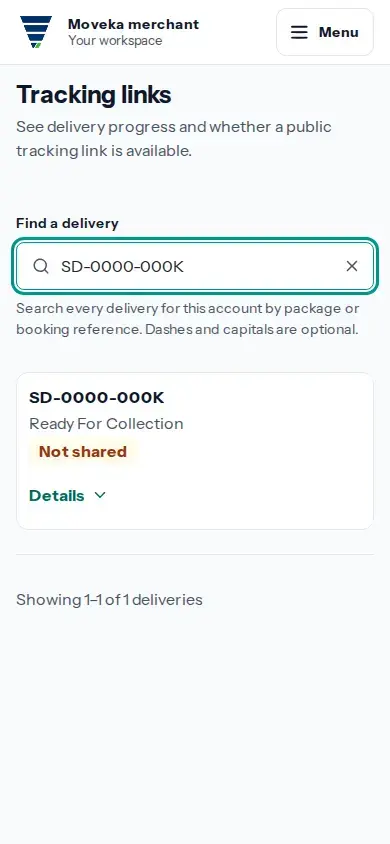
Practice screen: search one package and check its current collection status and that no public link is shared.
Practice example: search one package and check its current collection status and that no public link is shared.

View larger image: Practice screen: search one package and check its current collection status and that no public link is shared. (opens in a new tab)

If no delivery matches, check the reference or clear the search to see the account’s deliveries again. This account view checks progress and link availability.